E-mail forwarding refers to the operation of re-sending an e-mail message delivered to one e-mail address on to a different email address.
We will be discussing the steps to forward mail from Gmail. Mostly the steps for other email service providers is also almost the same.
Step 1 : Log in to your Gmail account.
Step 2 : Click on the Gear shaped icon at the top right of your page.
Step 3 : Click on Settings.
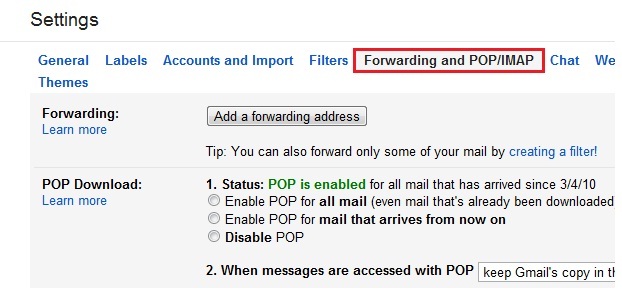
Step 4 : While on the Settings page click on “Forwarding and POP/IMAP” tab.
Step 5 : Click on “Add a forwarding address”.
Step 6 : Enter the e-mail address to which you want to forward to.
Step 7 : Confirm the address and click on proceed.
Step 8 : A confirmation mail will be sent to the account you just specified for verification.
Step 9 : Log in to that account and verify the mail address.
Step 10 : Go back to your Gmail account settings page and in forwarding tab click on forward a copy of incoming mail to “your mail address”.
There you go. That was all about e-mail forwarding in gmail.
In my previous benchmarks [1, 2], I showed that LLMs can successfully solve most Leetcode problems.…
Organizations are investing heavily in AI with the promise of faster work, better collaboration, and…
Cloud security firm Britive announced that its unified privileged access management (PAM) platform is now…
The Tech Panda takes a look at recent launches in the superfast field of Artificial…
The Tech Panda takes a look at recent funding events in the tech ecosystem, seeking…
India has one of the most extensive road networks in the world, growing at its…